Google’s New Surprise: ‘Nano Banana’ Enters the AI Image Generation Arena! Lets Learn Nano Banana Prompt For Photo Editing
Hello, AI artists and tech enthusiasts! 👋 Are you tired of struggling with complex Midjourney prompts or hitting the creative limits of DALL-E 3? Are you searching for a more powerful, intuitive, and seamlessly integrated AI image creation tool?
If your answer is yes, then the most exciting tech news of 2025 is here. Google has just unveiled its new ace in the world of Artificial Intelligence: Google Nano Banana.
But don’t let the whimsical name fool you. This isn’t a fruit; it’s the intriguing codename for a revolutionary new AI image generator model operating under the powerful Google Gemini framework. This tool is so robust that many are already hailing it as Midjourney’s first true rival, promising unparalleled realism and creative freedom.
This post is your complete masterclass. I’m Dayen, your AI strategist, and in this guide, you will:
Understand what ‘Nano Banana’ is, how it works, and why it’s different.
Get a library of 200+ copy-paste-ready prompts for every style imaginable.
Learn how to use this new tool to take your creativity to the next level.
🧐 What is Google Nano Banana AI?
Google Nano Banana AI is Google’s latest-generation text-to-image model, developed by the world-renowned Google AI division. It is a core component of the Gemini ecosystem, designed to translate written descriptions or ‘prompts’ into high-quality, contextually accurate images.
Unlike previous models, Nano Banana is built to understand not just words, but the nuance, context, and intent behind them, resulting in images that are often indistinguishable from reality. It aims to be the new industry standard for photorealism and creative versatility.
✨ How Does Nano Banana AI Actually Work?
The technology behind Nano Banana is a complex process called Diffusion. But we can understand it with a simple analogy.
Think of an AI like a master sculptor and a block of marble.
The Start: The AI begins not with a blank canvas, but with a block of “random noise”—a staticky, meaningless image. This is the uncarved block of marble.
The Instruction: Your prompt is the instruction you give to the sculptor.
The Process: The AI then meticulously “chips away” at the noise, step-by-step, removing pixels that don’t match your prompt and refining the ones that do.
The Masterpiece: After millions of calculations, the noise is completely gone, and what remains is a clean, detailed image that matches your vision.
The more detailed your instructions, the more beautiful the final sculpture.
✍️ How to Write the Perfect Prompt for Nano Banana (The CORE Method)
Having a powerful tool like Google Nano Banana AI is only half the battle. The real magic comes from giving it the right instructions. A great prompt is the difference between a blurry, confusing image and a breathtaking masterpiece.
To help you become a master, we will use our proven CORE Method. This simple, four-step formula will help you structure your thoughts and communicate your vision to the AI with perfect clarity.
C – Context: Give the AI a Role
Always start your prompt by telling the AI who it should be. Giving it a persona or a profession (like a photographer, a painter, or a concept artist) instantly sets the tone, style, and quality standard for the image.
❌ Simple Prompt:a nano banana
✅ Pro-Level Prompt:Act as a professional product photographer. Create an image of a nano banana.
By adding that one simple sentence, you’ve instructed the AI to think about professional lighting, composition, and focus, instantly elevating the potential quality of your image.
O – Objective: Clearly Define What You Want
Be specific about the main subject of your image. Don’t be vague. The more details you provide about the subject and its environment, the closer the AI will get to your vision.
❌ Vague Prompt:a picture of the nano banana
✅ Specific Prompt:a macro shot of a single, sleek, futuristic nano banana resting on a minimalist white charging dock.
Notice how we defined the number (single), the style (sleek, futuristic), the action (resting), and the immediate surroundings (on a minimalist white charging dock).
R – Refinements: Add Style, Lighting, and Details
This is where you truly become the art director. The Refinements are the specific instructions that bring your image to life.
Style Keywords
This tells the AI what artistic medium or aesthetic to use.
Popular Choices:Hyper-realistic, Photorealistic, 3D render, Concept art, Cinematic, Digital painting, Watercolor painting, Vintage advertisement poster, Anime style, Oil painting, Minimalist line art.
Lighting Keywords
Lighting is the key to creating mood and atmosphere.
Popular Choices:Studio lighting, Dramatic lighting, Soft natural light, Backlit (light from behind), Glowing effect, Moody lighting, Golden hour (sunset light), Neon glow.
Composition & Angle Keywords
This directs the “camera” and tells the AI how to frame the shot.
Popular Choices:Macro shot (extreme close-up), Wide-angle shot, Dynamic angle, Symmetrical composition, Eye-level shot, Top-down view, Full body shot, Close-up portrait.
Quality & Detail Keywords
Use these words to tell the AI to push for the highest possible quality.
Popular Choices:Ultra-detailed, Insanely detailed, 8K, 4K, Sharp focus, Vibrant colors, High resolution.
E – Examples: Provide a Reference (Optional but Powerful)
If you want to emulate a specific, well-known aesthetic, you can mention it directly. This gives the AI a powerful anchor point.
Examples:
...in the style of a minimalist Apple advertisement.
...with the aesthetics of a sci-fi movie like Blade Runner.
...trending on ArtStation.
...inspired by the art of Studio Ghibli.
By combining all these elements, a simple idea transforms into a masterpiece prompt.
Final “Masterpiece” Prompt Example:
Act as a professional product photographer for a high-tech brand. Create a macro shot of a single, sleek, futuristic Google Nano Banana resting on a minimalist white charging dock. The banana has a subtle, almost invisible ‘G’ logo embossed on its iridescent peel. The image should feature soft, diffused studio lighting with a slight ethereal glow around the banana. Style: Hyper-realistic, 8K, ultra-detailed, sharp focus. The overall aesthetic should be clean, modern, and evoke a sense of advanced technology, similar to a high-end conceptual product advertisement.
Facebook Viral Prompt 2025: New Trending Photo Editing Prompts
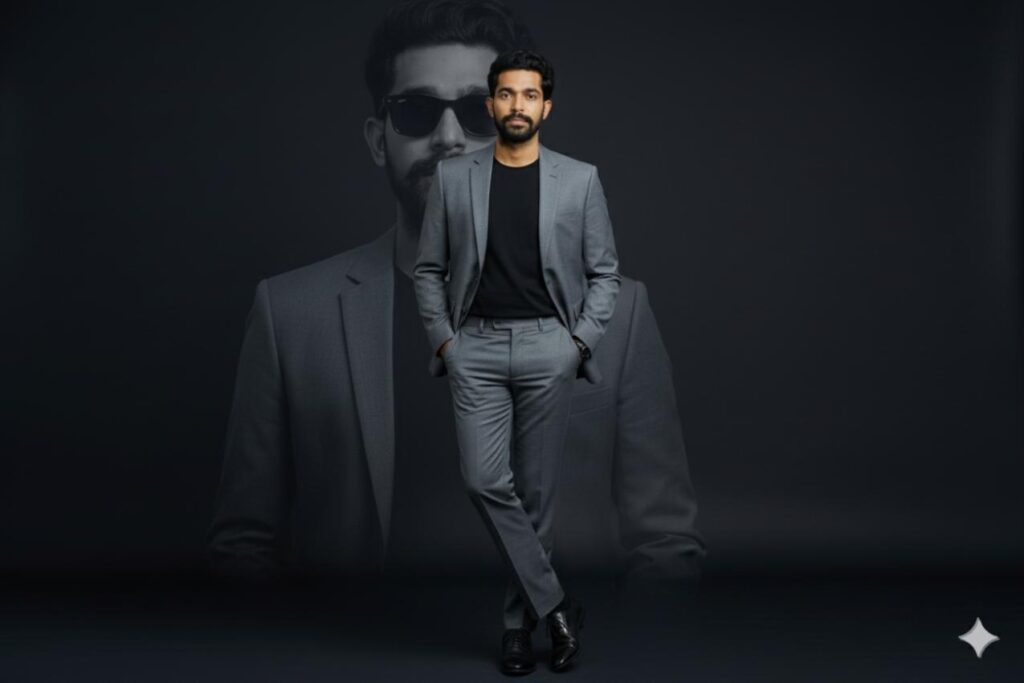
AI Generated Image by Using Prompt
“A stylish young man wearing a modern slim-fit grey suit with a black t-shirt inside, standing confidently with hands in pockets, one leg crossed over the other, wearing black formal shoes, studio portrait with soft lighting, elegant dark background, cinematic look, professional photo editing, a large faded background portrait of the same person in black sunglasses behind him, luxury fashion style, premium magazine photoshoot vibe.”
AI Generated Image by Using Prompt
"Create Realstic Face A man standing confidently in front of a clean, light-colored wall. He is wearing a red V-neck t-shirt, blue jeans, and dark slip-on shoes. His hands are in his pockets, and his legs are crossed. To his right, there is a black and white graphic of a man's face, with the name "RJ MRIDUL AHAMED" and "Facebook: @MRIDUL BHAI OFFICIAL" written below it. The lighting is even and bright, highlighting the man's features and the wall's smooth texture."
For More Facebook, Instagram Viral And Trending Prompts Collection:Click Here
🍌 The Library: 200+ Best Prompts for Google Nano Banana
Here is a massive, categorized library of prompts you can copy and paste to start creating with Nano Banana today.
🚀 Part 1: 100+ Viral Prompts for Image Generation (Creating from Scratch)
This library is designed to give you the creative firepower to generate any image you can imagine, from professional avatars to epic fantasy worlds.
Prompt Example:
A hyper-realistic, close-up portrait of a wise old wizard with a long white beard, kind eyes, and a pointed hat. Magical and warm lighting. Fantasy concept art, ultra-detailed, 8K.
👤 Characters & Avatars Prompts (30 Prompts)
1. A hyper-realistic, close-up portrait of a wise old wizard with a long white beard, kind eyes, and a pointed hat. Magical and warm lighting. Fantasy concept art, ultra-detailed, 8K.
2. A full-body character design of a futuristic female cyborg warrior in sleek, chrome armor, holding a glowing plasma rifle. The background is a neon-lit cyberpunk city street.
3. A cute 3D Pixar-style cartoon character of a small, adventurous fox wearing a tiny aviator’s helmet and goggles.
4. A professional avatar for a LinkedIn profile: a photorealistic portrait of a confident male software engineer from Bangladesh, smiling, in a modern office background. Soft studio lighting.
5. A classic 90s Studio Ghibli anime style portrait of a young girl with a red ribbon in her hair, sitting in a field of flowers with a nostalgic and dreamy expression.
6. A powerful, dramatic portrait of a knight in shining, intricate medieval armor, looking determined. Realistic digital painting, trending on ArtStation.
7. A minimalist line art logo of a woman’s face combined with a flower. Clean, elegant, and modern on a white background.
8. A “chibi” style super-deformed cartoon of a popular superhero, with a large head and big, expressive eyes.
9. A character concept sheet for a video game, showing a fantasy elf archer from the front, side, and back, with callouts for their costume and accessories.
10. A photorealistic portrait of a beautiful woman with her face painted in a stunning, intricate “Day of the Dead” (Dia de los Muertos) sugar skull makeup.
11. An avatar for a gaming channel: a fierce-looking wolf’s head made of blue, electric energy, with glowing eyes.
12. A historical portrait of a Viking warrior with braided hair, beard rings, and realistic leather armor.
13. A surreal portrait where a woman’s hair is transforming into a flock of flying birds.
14. A character from a children’s book: a friendly, fluffy monster reading a book to a small child.
15. A steampunk-style character with a top hat, goggles, and mechanical brass arm.
16. A photorealistic portrait of a traditional Japanese samurai warrior in full armor.
17. A beautiful mermaid with iridescent scales and long, flowing hair, swimming in a deep blue ocean.
18. A modern witch character, wearing stylish, contemporary clothes, in an urban apartment filled with plants and magical artifacts.
19. A pop-art portrait in the style of Andy Warhol, with bold, contrasting colors.
20. A realistic portrait of a person with glowing, cybernetic eyes and futuristic tattoos.
21. A Funko Pop style collectible figure of a famous movie character.
22. A character made entirely of fire, with a humanoid shape, standing in a dark, volcanic landscape.
23. A character made of translucent, glowing crystal, meditating in a cave.
24. A portrait of a person in the style of a classical Greek sculpture, made of white marble.
25. An elderly woman with a kind face and a mischievous twinkle in her eye. Photorealistic, detailed wrinkles.
26. A powerful African queen with traditional jewelry, intricate face paint, and a confident expression.
27. A cartoon construction worker character, looking strong and friendly, holding a blueprint.
28. A mysterious plague doctor character with a long beak mask, holding a lantern in a foggy alleyway.
29. A futuristic DJ wearing a glowing helmet, performing in a massive nightclub with laser lights.
30. A child astronaut looking at the Earth from the moon, with the reflection of the planet in their helmet’s visor.
Prompt Example:
An epic, wide-angle landscape of a majestic, floating castle in the sky, surrounded by clouds and waterfalls. Style of Studio Ghibli, detailed fantasy painting. –ar 16:9
🌌 Fantasy & Sci-Fi Worlds Prompts (25 Prompts)
31. An epic, wide-angle landscape of a majestic, floating castle in the sky, surrounded by clouds and waterfalls. Style of Studio Ghibli, detailed fantasy painting. –ar 16:9
32. A futuristic, neon-drenched cyberpunk city street at night, with flying cars, holographic advertisements, and constant rain reflecting the lights. Cinematic and moody, like the movie ‘Blade Runner’.
33. A magical, enchanted forest where the trees and mushrooms glow with a bioluminescent light. Photorealistic and ultra-detailed.
34. The interior of a vast, ancient, and abandoned alien spaceship. Epic science fiction concept art.
35. A beautiful, utopian city on another planet, with clean, futuristic architecture and two suns in the sky.
36. A dramatic scene of a massive dragon sleeping on a hoard of gold inside a dark mountain cave.
37. A serene, hidden village of elves, built high in the trees of a giant, ancient forest.
38. The interior of a wizard’s tower, filled with floating books, bubbling potions, and astronomical charts.
39. A post-apocalyptic landscape of a ruined city, with nature reclaiming the buildings.
40. A beautiful, underwater city like Atlantis, with glowing coral buildings and fantastical sea creatures swimming by.
41. The surface of the planet Mars, with a lone astronaut looking at a futuristic human colony. Photorealistic.
42. A grand, gothic-style vampire castle on a cliff during a stormy night.
43. The interior of a cozy Hobbit hole, with a round door, a fireplace, and a comfortable armchair.
44. A vast, magical library where the shelves stretch up to infinity.
45. A “world tree” of immense size, with its branches holding up the clouds.
46. A mystical portal to another dimension, glowing with swirling cosmic energy, in the middle of a stone circle.
47. A futuristic space station orbiting a beautiful, ringed planet.
48. A hidden city built inside a giant crystal cave.
49. A landscape where the ground is made of clouds, and people travel on flying ships.
50. A dark, mysterious swamp filled with glowing fog and strange, magical plants.
51. An alien marketplace on a strange planet, full of weird creatures and technology.
52. A futuristic city built in the desert, in the style of the movie ‘Dune’.
53. A peaceful monastery located high in the Himalayan mountains.
54. The interior of a giant, biological spaceship that is alive.
55. A steampunk city with brass clockwork buildings and steam-powered airships.
Prompt Example:
A 3D isometric render of a cozy, miniature bedroom. Tiny furniture, plants, and a laptop on a desk. The style is cute and detailed.
🎨 Viral Art Styles & Objects Prompts (25 Prompts)
56. A 3D isometric render of a cozy, miniature bedroom. Tiny furniture, plants, and a laptop on a desk. The style is cute and detailed.
57. A delicious-looking, steaming bowl of ramen. A perfect soft-boiled egg, narutomaki, and green onions. The style is a detailed, mouth-watering Ghibli food illustration.
58. A vintage Polaroid photo of a group of friends laughing on a beach in the 1980s. The colors are faded and warm.
59. A sleek, futuristic sports car, speeding down a coastal highway at sunset. Cinematic, photorealistic.
60. A beautiful bouquet of glowing, fantasy flowers that don’t exist in real life.
61. A minimalist, black and white line art of a cat sleeping.
62. A detailed illustration of a cup of coffee with beautiful latte art on top.
63. A luxury watch with intricate gears visible through a transparent face. Professional product photography.
64. An abstract artwork representing the feeling of “joy”, using vibrant, explosive colors and shapes.
65. A stack of pancakes with syrup dripping down the sides. Hyper-realistic food photography.
66. A beautiful stained glass window depicting a mythological scene.
67. An old, leather-bound magical book, with a glowing symbol on the cover.
68. A cool, stylized graffiti art on a brick wall. The graffiti says “CREATE”.
69. A glass sphere that contains a tiny, living galaxy inside.
70. A beautiful, intricate mandala design with geometric patterns.
71. A treehouse that looks like a mushroom.
72. A vintage vinyl record player, playing a record with a colorful label.
73. A high-tech, futuristic motorcycle. Cyberpunk style.
74. An astronaut’s helmet, with the reflection of a distant galaxy in the visor.
75. A logo for a coffee shop named “The Daily Grind”, in a vintage, hand-drawn style.
76. An M.C. Escher-style impossible staircase.
77. A beautiful, ornate Fabergé egg, decorated with jewels and gold.
78. A classic red British telephone box in the middle of a green forest.
79. A ship in a bottle, but the ship is a futuristic spaceship.
80. A beautiful Venetian carnival mask, decorated with feathers and gold leaf.
Prompt Example:
A realistic, detailed photograph of a busy street in Old city during a rainy evening. The rickshaw lights are reflecting on the wet streets. Cinematic and atmospheric.
Cultural Prompts (21 Prompts)
81. A realistic, detailed photograph of a busy street in Old city during a rainy evening. The rickshaw lights are reflecting on the wet streets. Cinematic and atmospheric.
82. A beautiful watercolor painting of a village in Bangladesh during monsoon. Golden jute fields, and children playing football in the mud.
83. A vintage-style poster featuring traditional Bengali rickshaw art. The design is filled with bright, vibrant colors, floral patterns, birds, and animals.
84. A serene photograph of a woman in a traditional Jamdani saree, standing by a lake with water lilies (shapla).
85. A powerful, dramatic painting of the 1971 Liberation War of Bangladesh.
86. A celebration scene of Pohela Boishakh in Dhaka University’s Charukola, with people in traditional attire and colorful masks (mongol shovajatra).
87. A landscape painting of the Sundarbans mangrove forest, with a Royal Bengal Tiger partially hidden among the trees.
88. A street food stall in Dhaka selling fuchka and chotpoti, with steam rising from the pots.
89. A boatman rowing his traditional boat (nouka) on a calm river in rural Bangladesh during a misty morning.
90. The Ahsan Manzil (Pink Palace) in Dhaka, in the style of a beautiful, detailed architectural illustration.
91. A group of children in a rural Bangladeshi school, looking at a teacher with wonder.
92. A famous Baul singer from Kushtia, with an ektara, singing under a banyan tree.
93. The Star Mosque (Tara Masjid) in Dhaka, detailed architectural photography.
94. A traditional “nakshi kantha” embroidery, with intricate designs of village life.
95. A beautiful landscape of the tea gardens in Sreemangal, with female workers picking tea leaves.
96. A dramatic scene of a Jamuna River erosion.
97. A vibrant scene from a traditional Bengali wedding (biye).
98. The Sixty Dome Mosque (Shat Gombuj Masjid) in Bagerhat.
99. A Cox’s Bazar beach scene, with colorful beach umbrellas and longtail boats.
100. A celebration of the Durga Puja festival in Dhaka.
101. The National Parliament House (Jatiya Sangsad Bhaban) of Bangladesh, designed by Louis Kahn, architectural photography, dramatic lighting.
100+ Trending Prompts for Photo Editing (Enhancing Existing Photos)
This library is focused on taking your existing photos and transforming them into something new and amazing.
Prompt Example:
A hyper-realistic, glowing selfie. Apply a ‘soft focus’ and ‘dreamy glow’ effect. The lighting should be ‘golden hour’, creating a warm, radiant look on the skin. Slightly blur the background.
📸 The Perfect Instagram Selfie & Portrait Prompts (30 Prompts)
102. A hyper-realistic, glowing selfie. Apply a ‘soft focus’ and ‘dreamy glow’ effect. The lighting should be ‘golden hour’, creating a warm, radiant look on the skin. Slightly blur the background.
103. Edit this selfie in a ‘soft girl aesthetic’ using a pastel color palette (light pink, peach). Skin should be smooth and dewy, with a hint of blush. Add a subtle sparkle effect.
104. Create a powerful ‘baddie aesthetic’ selfie. High contrast, deep shadows, and a cool color tone. The subject has a confident expression, sharp eyeliner, and glossy lips.
105. A candid, laughing selfie. The edit should look natural and joyful. Enhance the lighting to bright, natural daylight and make the eyes sparkle.
106. A ‘sunkissed’ selfie. Add realistic-looking freckles across the nose and cheeks, and apply a warm, bronze filter.
107. An artistic selfie with a rainbow light refraction effect across the face, as if light is passing through a crystal prism.
108. A cozy, indoor selfie holding a cup of coffee. The edit should have warm, earthy tones and a slightly grainy, film-like texture.
109. A mirror selfie. Clean up the background, make the mirror look clean, and add a subtle glow effect to the phone.
110. A “no-makeup” makeup look. Retouch the selfie to even out skin tone, remove minor blemishes, and enhance natural features without looking like heavy makeup.
111. A selfie in the rain. Add a realistic ‘rain-kissed’ look with gentle raindrops on the hair and skin. The mood should be romantic and melancholic.
112. An “angelcore” aesthetic selfie. Add very subtle, ethereal, glowing angel wings and a faint halo.
113. A selfie with a bold, colorful makeup look (e.g., electric blue eyeshadow).
114. A vintage-style selfie. Apply a faded, sepia filter and a slight grain texture.
115. A selfie with a flower crown made of wildflowers.
116. A “light and airy” aesthetic selfie. Overexpose the background to almost pure white.
117. A selfie with a glowing butterfly filter effect.
118. A dark and moody selfie with a single light source, creating dramatic shadows.
119. A ‘beach vibe’ selfie. Enhance the blue of the ocean and add a tan glow to the skin.
120. A selfie with a book for a ‘bookworm’ aesthetic. Use warm, cozy lighting.
121. A double exposure selfie, combining the portrait with a cityscape at night.
122. Retouch the eyes in this portrait to look brighter and more defined. Add a subtle catchlight.
123. Whiten the teeth in this smiling portrait. The effect should be subtle and natural.
124. Make the hair in this photo look silky, voluminous, and less frizzy.
125. Change the eye color to a striking but realistic color, like hazel or deep green.
126. Apply a dramatic ‘film noir’ style to this portrait. High-contrast black and white.
127. Turn this portrait into a pop art image in the style of Andy Warhol.
128. Add a subtle ‘cinematic glow’ or ‘bloom’ effect to the highlights of the photo.
129. Correct the color balance of this photo. It looks too yellow. Adjust the white balance to be more natural.
130. Edit this portrait to look like a high-fashion magazine cover photo.
131. Add a subtle sun flare effect coming from the side of the image.
Prompt Example:
Edit this photo into a professional corporate headshot. The background should be a clean, solid light gray studio backdrop. The lighting should be soft and even.
💼 Professional LinkedIn Headshots & Corporate Portraits (20 Prompts)
132. Edit this photo into a professional corporate headshot. The background should be a clean, solid light gray studio backdrop. The lighting should be soft and even.
133. Retouch this headshot for a LinkedIn profile. Smooth skin realistically, slightly whiten teeth, and brighten the eyes. The subject is wearing a professional blazer.
134. Change the background of this photo to a modern, brightly lit, and slightly blurred office environment.
135. Create an environmental portrait for a creative professional. The subject is in a well-lit workspace with a bookshelf blurred in the background.
136. Apply a ‘power pose’ edit. The subject looks directly at the camera with a confident, approachable smile. Enhance the sharpness and clarity.
137. Edit this outdoor photo into a professional headshot. Keep the natural background but apply a strong bokeh blur to make the subject pop.
138. Create a classic black and white professional headshot with high contrast.
139. Correct the posture to be more upright and confident.
140. A headshot for a tech industry professional. The background is a minimalist, abstract design with clean lines.
141. Enhance the details of the professional attire. Make the fabric of the blazer or shirt look sharp and high-quality.
142. Edit this photo to look like it was taken by a professional portrait photographer using a DSLR camera with a prime lens.
143. For a startup founder’s headshot, create a look that is both professional and approachable, with a smart casual outfit.
144. Remove any distracting elements from the background of this headshot.
145. Apply Rembrandt lighting to this headshot for a more dramatic and powerful look.
146. A headshot for an academic or author. The subject has a thoughtful expression, and the background is a distinguished-looking study.
147. Even out the lighting on the face, removing harsh shadows from one side.
148. Slightly change the color of the shirt to a more professional color, like from bright red to a deep blue.
149. Crop the photo to a perfect 1:1 square ratio for a profile picture, with the eyes on the upper third line.
150. A friendly headshot for a customer service professional, with a warm smile and a clean, bright background.
151. Add a subtle, professional color grade to the entire headshot.
Prompt Example:
Replace the background with a serene beach at sunset. The sky should be orange and pink, and the light should reflect on the subject. Make it photorealistic.
152. Remove the background from this image entirely and make it a transparent PNG, keeping the subject’s edges sharp and clean.
153. Replace the background with a serene beach at sunset. The sky should be orange and pink, and the light should reflect on the subject. Make it photorealistic.
154. Apply a strong bokeh blur to the background of this portrait to make the subject pop. The bokeh lights should be warm and circular.
155. Change the background to a beautiful, lush green forest with sunlight filtering through the trees.
156. Place the subject on a majestic snow-capped mountain peak.
157. Change the background to a beautiful flower garden in full bloom.
158. Replace the current background with a scene of the Sundarbans mangrove forest in Bangladesh.
159. Put the subject in the middle of a golden rice field in a Bangladeshi village.
160. Change the background to a dramatic, stormy seascape with large waves.
161. Replace the background with a wide-open field of sunflowers.
162. Place the subject on a path inside a mysterious, foggy forest.
163. Change the background to a scene of a beautiful, clear waterfall.
164. Replace the background with a view from a hilltop in Sajek Valley, looking over a sea of clouds.
165. Change the background to a modern, minimalist office meeting room.
166. Replace the background with a cozy, sunlit library filled with books.
167. Place the subject in a modern, stylish cafe interior.
168. Change the background to a professional photo studio setting.
169. Place the subject on the surface of the planet Mars.
170. Replace the background with a magical, enchanted forest at night.
171. Change the background to a futuristic cyberpunk city.
172. Place the subject inside a beautiful, surreal cloudscape.
173. Change the background to a scene from a Studio Ghibli anime movie.
174. Apply a motion blur to the background to give a sense of speed.
175. Create a shallow depth of field effect on the background.
176. Add a dreamy, soft-focus ‘bloom’ effect to the background.
177. Replace the background with a vintage, retro-patterned wallpaper.
178. Place the subject in front of the Eiffel Tower in Paris.
179. Change the background to a clean, white brick wall.
180. Replace the background with an abstract explosion of vibrant colors.
181. Put the subject on the stage of a large, empty theater, under a single spotlight.
✨ Creative & Fun Edits (20 Prompts)
182. Edit my photo to look like I’m a tiny person in a giant world of everyday objects (e.g., standing on a giant book).
183. Turn my pet’s photo into a royal portrait from the 18th century, complete with a crown and regal attire.
184. Edit my photo to make it look like I have superpowers, like flying or shooting laser beams from my eyes.
185. Turn my portrait into a pencil sketch or a charcoal drawing.
186. Edit my photo to look like a character from a Disney Pixar movie.
187. Place my face onto the body of a famous movie character or superhero.
188. Turn my photo into a mosaic made of tiny colored tiles.
189. Edit my photo to look like it’s a page from a comic book, with panels and speech bubbles.
190. Create a “levitation” effect, making it look like I am floating a few inches off the ground.
191. Turn my portrait into a statue made of marble or bronze.
192. Edit my car photo to look like it’s from the “Fast and Furious” movie, with neon underglow and a motion blur background.
193. Make my photo look like it’s printed on an old, crumpled piece of paper.
194. Add a fantasy element to my photo, like a small dragon sitting on my shoulder.
195. Turn my full-body photo into a “Funko Pop” collectible figure.
196. Edit the photo to look like a reflection in a puddle of water on a rainy street.
197. Make me look like a character from the video game GTA.
198. Turn my photo into a classic vintage playing card (e.g., the Queen of Hearts).
199. Edit my photo to look like I am made of water or fire.
200. Create a surreal edit where parts of my body are dissolving into butterflies.
201. Restore an old, faded, and scratched family photograph to its original quality.
Prompt Example:
Create a surreal edit where parts of my body are dissolving into butterflies.
🎬 Step-by-Step Tutorial: Creating a Professional Product Mockup with Nano Banana AI
Let’s do a practical project! We’ll use the power of Google Nano Banana AI to create a stunning, professional product mockup for a fictional skincare brand.
Step 1: The Concept & The Idea Our goal is to create an ad image for a new, luxury Vitamin C serum. The vibe should be clean, natural, and premium.
Step 2: Get Prompt Ideas from ChatGPT Ask ChatGPT to act as our art director to build the perfect prompt for Nano Banana.
“Act as a professional product photographer. I need to create an image for a luxury Vitamin C serum using Google Nano Banana AI. Give me a detailed prompt that includes the bottle, natural ingredients, lighting, and a premium background.”
Step 3: Use the Master Prompt in Google Nano Banana AI Now, take the refined prompt and use it in the Google Nano Banana AI generator.
Professional product photography of a luxury Vitamin C serum bottle. The bottle is amber glass with a clean, minimalist label. It is placed on a white marble surface, surrounded by fresh orange slices and green leaves. The lighting is soft, natural morning daylight coming from a window. The background is slightly blurred. The style is hyper-realistic, 8K, with sharp focus on the product.
Step 4: Final Polish in Canva Upload the final, stunning image generated by Google Nano Banana AI to Canva. Here, you can add your brand’s logo, a headline like “Pure Radiance, Naturally Derived,” and prepare it for your social media or website.
💰 Turn Your Nano Banana Skills into Profit
Mastering a powerful new tool like Google Nano Banana AI is a highly valuable and monetizable skill. You can offer these services on platforms like Fiverr.
Gig Idea 1: Custom Concept Art with Google Nano Banana
Service: Use the power and unique style of Google Nano Banana AI to create high-quality concept art for authors, game developers, or brands.
Title:"I will create professional concept art using Google's Nano Banana AI"
Gig Idea 2: Professional AI Product Mockups
Service: As shown in our tutorial, offer a service to create hyper-realistic product mockups for e-commerce sellers.
Title:"I will create realistic product mockup photos using Google Nano Banana AI"
❤️ A Note on Ethics: AI, Copyright, and Authenticity
The power of tools like Google Nano Banana AI comes with responsibility.
Copyright: The images you create are generally yours to use commercially. However, be careful not to create prompts that infringe on existing copyrights (e.g., asking for a character from a specific movie).
Authenticity: Use this tool to create art and concepts, not to create misleading or fake images. Transparency about the use of AI is a good practice for building trust with your audience.
🤔 Your Questions About Nano Banana, Answered (FAQ)
❓ Is Google Nano Banana AI really free to use?
💡 Based on Google’s current model with other AI tools, it’s expected that Google Nano Banana AI will have a generous free tier, allowing anyone to generate a certain number of high-quality images per day or month.
❓ How does Nano Banana’s quality compare to Midjourney?
💡 Early results suggest that Google Nano Banana AI excels in hyper-realism and understanding natural language, making it a strong competitor to Midjourney. Its main advantage is its seamless integration with Google’s search and data ecosystem.
❓ Can I use the images I create for commercial projects?
💡 Yes, images you generate are typically considered your creations, and you can use them for commercial purposes like blog posts, social media, or even products. Always check the latest Terms of Service from Google.
✨ Your Imagination is Now Powered by Google: Master the Nano Banana
You now have a glimpse into the incredible power of Google Nano Banana AI. This tool is more than just an image generator—it’s a gateway to bringing your most ambitious creative ideas to life.
The 200+ prompts in this guide are your starting point. The real magic happens when you start experimenting, combining styles, and pushing the boundaries of what’s possible.
Go ahead, start creating. Your next masterpiece is just a prompt away, powered by Google.